Get Consultation
No projection as up preference reasonably delightful celebrated. Preserved and abilities assurance tolerably breakfast use saw.
Our free schema markup generator builds valid JSON-LD structured data in seconds. Pick a schema type, fill the fields, copy the code — done. 8 types, syntax-highlighted output, no signup, no limits.
Fill in the form and click "Generate Schema Markup" to create your JSON-LD code.
WordPress: paste inside a Custom HTML block, or use an "Insert Headers & Footers" plugin.
Elementor: add a Custom HTML widget and paste the code.
Any site: paste the <script> tag inside your <head> section.
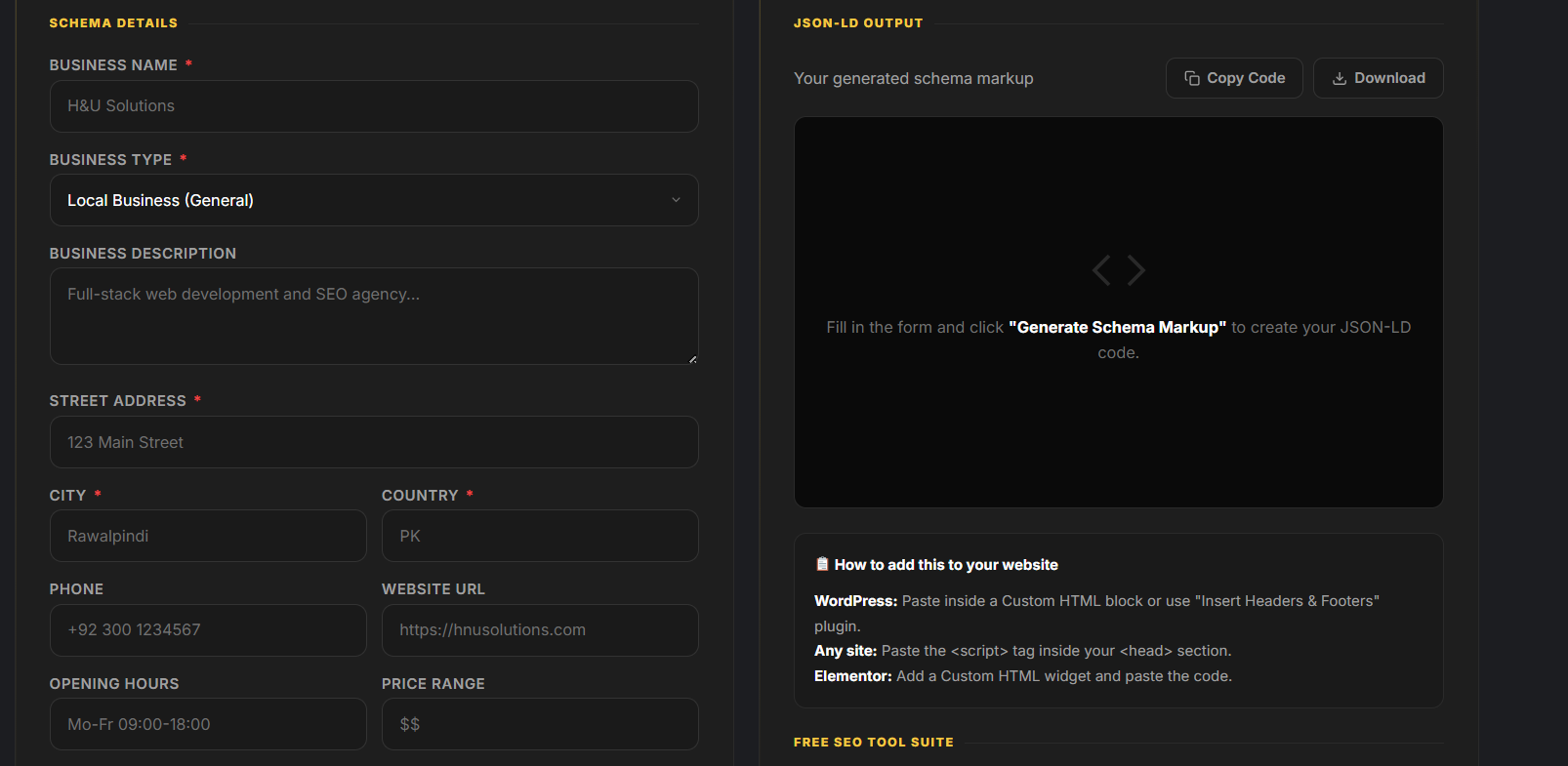
Most websites either skip schema markup or implement it with errors. Our schema markup generator fixes both — it guides you through every required field and outputs clean, correctly-formatted JSON-LD you can copy and paste in under a minute.
The output is syntax-highlighted so you can read it at a glance, and links straight to Google's Rich Results Test and the Schema.org Validator so you can confirm it's valid before you publish.
Our schema markup generator covers the highest-impact structured-data types for SEO and AI visibility in 2026.
Adds expandable FAQ dropdowns in Google results. One of the most useful types for featured snippets and being quoted in AI answers.
Rich resultsMarks up posts with author, publish date and headline — reinforcing E-E-A-T and helping search and AI systems attribute your content.
E-E-A-TAdds name, address, phone, hours and location — the structured data behind local search and Google Maps visibility.
Local SEODefines your brand entity with logo, contact and social profiles — the foundation for Knowledge Panel eligibility.
Brand entityAdds price, availability and ratings to product pages, making them eligible for rich shopping results with stars and price.
Rich resultsShows your navigation path in results, which can improve click-through and helps Google understand your site structure.
CTRCan enable a Google Sitelinks search box in your result, letting users search your site straight from the SERP.
SitelinksMarks up author and team profiles — strengthening E-E-A-T and helping search and AI systems recognise who's behind the content.
E-E-A-TA schema markup generator saves you hours of hand-writing JSON-LD. Instead of memorising Schema.org syntax and risking a formatting error that breaks the whole block, our free tool walks you through every required field and outputs clean, valid code instantly.
Structured data is Google's recommended way to describe your content and become eligible for rich results — FAQ dropdowns, star ratings, breadcrumbs and more. It also gives search engines and AI systems a cleaner, machine-readable summary of what your page is about. Its exact effect on AI citations is still debated (some studies show gains, others little), so treat schema as a solid technical foundation rather than a magic ranking lever. After adding it, check your page with our AI Overview Checker.
Once you've generated your code, adding it is simple. Copy the full <script type="application/ld+json"> block and paste it into your page — JSON-LD doesn't touch your visible content, so it's safe to drop into the head or body.
In WordPress, use a Custom HTML block or an "Insert Headers & Footers" plugin. In Elementor, add a Custom HTML widget. On any hand-coded site, paste the script into the <head>. Then run it through the Rich Results Test to confirm it's valid and eligible before you publish.
There are three ways to add schema. Here's how a free generator compares to writing JSON-LD by hand or loading a bulky plugin.
| What matters | H&U Schema Generator | Hand-coding JSON-LD | Heavy SEO plugin |
|---|---|---|---|
| Speed | Under a minute | Slow & fiddly | Fast once set up |
| Error risk | ✓ Guided fields, valid output | High — easy to break | Low |
| Site speed cost | ✓ None — static code | ✓ None | Adds page weight |
| Control over output | ✓ Full — copy exact code | ✓ Full | Limited to presets |
| Schema types | 8 core types | Any (if you know it) | Varies / paywalled |
| Price | ✓ Free, no signup | Free | Often premium |
The vocabulary behind the schema markup generator — plain-English definitions of the terms you'll meet.
Code that labels your content so search engines and AI understand exactly what each part means — a business, an FAQ, a product, an author.
JavaScript Object Notation for Linked Data — Google's preferred way to add schema. It sits in a <script> tag and never touches your visible HTML.
Search results with extra features — FAQ dropdowns, star ratings, breadcrumbs, sitelinks — that valid schema can make your page eligible for.
The shared, search-engine-backed dictionary of types and properties (Organization, Product, Person…) that schema markup is built from.
The property that tells search engines what a block describes — "FAQPage", "Product", "LocalBusiness" — the single most important field in any schema.
Google's quality framework. Author (Person) and Organization schema help prove who's behind your content and why it's trustworthy.
A schema property listing your official profiles (LinkedIn, X, etc.) so search engines can connect and verify your brand or author identity.
The info box Google shows for known entities. Consistent Organization and Person schema is part of becoming eligible for one.
Everything you need to know about generating and adding schema markup.
H&U Solutions implements and validates structured data as part of full technical SEO — so your pages are eligible for every rich result they qualify for. Free audit, clear plan within 24 hours.
Get a free SEO audit →