Get Consultation
No projection as up preference reasonably delightful celebrated. Preserved and abilities assurance tolerably breakfast use saw.
Our free meta title checker measures your title tag and meta description in real, pixel-accurate widths — with a live Google SERP preview, keyword placement analysis, title-rewrite risk check, and one-click copy of your optimized tags.
A pixel-accurate SERP preview and instant analysis — everything updates in real time as you type, no signup and no waiting.
Type or paste your title tag. The character counter and true pixel-width bar update instantly and colour-code green, amber or red against Google's limits.
Enter your meta description. The live Google SERP preview updates in real time, showing exactly how your snippet appears on desktop and mobile.
The checker highlights your keyword exactly as Google bolds it, and flags whether it sits near the start of your title where it counts most.
Click Analyze for a full breakdown — length, pixel width, keyword placement, rewrite risk and fixes — then copy your optimized title and description.
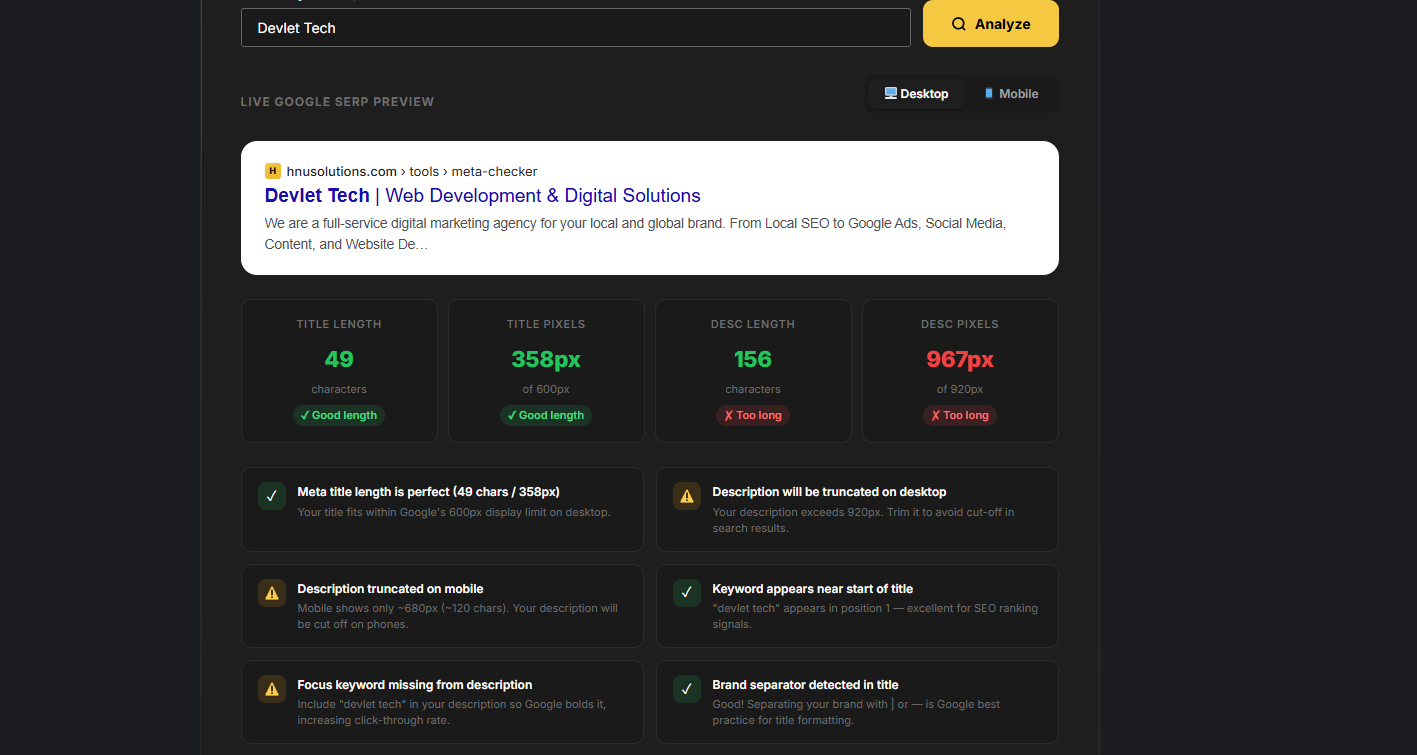
Most meta title checker tools only count characters. Ours renders your text with Google's actual fonts and measures the exact pixel width — the real number Google uses to decide where your title gets cut off. That means a pixel-accurate preview, not a rough character guess.
Switch between desktop and mobile instantly. The meta title checker highlights your focus keyword exactly as Google bolds it, so you can see whether your snippet stands out from the competition before you publish.
Our free meta title checker helps you nail the right title length every time. Google displays titles by pixel width, not character count — the desktop limit is roughly 600 pixels, about 50–60 characters for most words.
A title over 600 pixels gets truncated with "…" in search results, cutting off your message or your brand name. Because our tool measures the real rendered width, you always know exactly where Google will cut your title — not a guess based on character count.
Our meta description checker measures your description against Google's 2026 display limits — up to ~920 pixels on desktop (about 155–160 characters) and ~680 pixels on mobile (about 120 characters).
Meta descriptions aren't a direct ranking factor, but they're the single biggest lever for click-through rate. When your keyword appears in the description, Google bolds it in results — making your snippet more visible and clickable than competitors who leave it out.
Our SERP preview tool shows exactly how your page will look in Google before you hit publish — because what you type into your CMS and what Google actually displays can differ, especially near the pixel limit.
Plenty of pages lose clicks simply because the title truncates at an awkward point, cutting off the brand or the most persuasive words. This tool removes the guesswork with a pixel-accurate desktop and mobile preview that updates as you type. Pair it with our AI Overview Checker and schema markup generator for complete search visibility.
Most free meta title checkers only count characters — which is why their previews are often wrong near the limit. Here's how ours compares.
| Feature | H&U Meta Title Checker | Character-count tools | Guessing in your CMS |
|---|---|---|---|
| Length measurement | Real pixel width (Google fonts) | Character count only | None |
| Truncation accuracy | ✓ Pixel-accurate "…" point | Rough / often wrong | ✗ Unknown until live |
| Live SERP preview | ✓ Desktop + mobile | Sometimes | ✗ No |
| Keyword & rewrite checks | ✓ Placement + rewrite risk | Rarely | ✗ No |
| Copy optimized tags | ✓ One click | Manual | Manual |
| Price | ✓ Free, no signup | Usually free | Free |
The vocabulary behind the meta title checker — plain-English definitions of the terms that decide how your snippet looks in Google.
The clickable headline of your search result. Google's #1 on-page signal for what a page is about, and the biggest driver of clicks.
The grey text under your title in search results. Not a direct ranking factor, but the strongest lever you control for click-through rate.
Google truncates titles and descriptions by rendered pixel width, not character count — which is why a real measurement beats counting letters.
The Google results page. A SERP preview shows how your title and description will actually appear there before you publish.
When your title or description is too wide, Google cuts it and adds an ellipsis — often losing your brand or your best words.
Google may replace your title in results if it's too long, stuffed, all-caps, or boilerplate. A clean, right-length title is kept as written.
The share of searchers who click your result. Strong titles and descriptions lift CTR, which sends positive signals back to Google.
Google bolds words in your snippet that match the search query — so including your keyword in the title and description makes you stand out.
Yes — arguably more than before. AI Overviews don't replace the classic blue-link result; they sit above it. Your meta title is still what wins the click on that organic listing when a searcher scrolls past the AI answer, and a sharp, keyword-led title is what pulls them to you instead of a competitor.
What a meta title can't do is get you into an AI Overview — that's decided by your content's clarity, depth and structure, not your title tag. So treat them as a pair: use this meta title checker to win the classic click, then score the page itself with our AI Overview Checker to see whether it's ready to be cited in AI answers, and our content quality checker to measure the depth and readability those answers reward.
Wherever your site lives, the meta title is the same thing under the hood — the page's <title> tag — but each platform surfaces it differently. As a WordPress and Shopify development team, here's where we edit it day to day.
In WordPress with Rank Math or Yoast, open the SEO snippet editor below the content and edit the "SEO title" field — not the H1. Both plugins preview length by character count, so paste the final version into this pixel-accurate checker before you publish. In Shopify, it's under Edit website SEO on any product, collection or page. On raw HTML sites, it's the <title> in the <head>.
Whichever you use, the workflow is the same: write the title, confirm it's under ~600px here, put your keyword in the first few words, then align the rest of the page with our keyword density checker and schema markup generator so every on-page signal is consistent.
Free guides from the H&U Solutions team to help your pages rank in classic search and get cited in AI answers.
The step-by-step process to get your pages quoted in Google's AI answers.
Read guide →The nine signals that decide whether your content ranks and gets cited.
Read guide →Seven reasons Google skips your pages in AI answers — and the fixes.
Read guide →Which AI bots crawl your site — GPTBot, ClaudeBot, PerplexityBot — and how to control them.
Read guide →Everything you need to know about optimizing your meta title and description for Google search.
Beyond the meta title checker, H&U Solutions offers a full suite of free tools to help you rank in classic and AI search. Every tool is live and free — no signup.
Score your page's GEO readiness and see if you'll appear in Google AI Overviews and AI Mode.
Open tool →Generate valid FAQ, Article and Organization JSON-LD schema in seconds.
Open tool →Analyze keyword usage and avoid the over-optimization that hurts rankings.
Open tool →Score your content's depth, clarity and E-E-A-T — the signals AI search rewards.
Open tool →Test LCP, CLS and INP against Google's thresholds in one click.
Open tool →Find and fix broken links that waste crawl budget and hurt trust.
Open tool →Generate an XML sitemap so Google and AI engines index every page fast.
Open tool →Get a complete on-page + technical SEO audit and roadmap from our team.
Book now →H&U Solutions combines technical SEO, GEO optimization and full-stack web development to grow your organic traffic and leads.
Get a free SEO audit →